Author:Chen Muhuan|Last updated date: April, 2026|Next review date: February 2027
In the modern workplace, knowledge workers are tasked with processing enormous volumes of information—roughly the equivalent of over 170 newspapers each day. Traditional handwritten notes, once the backbone of capturing and organizing knowledge, are increasingly unable to keep up with this fast-paced, high-density information flow. Enter AI-powered note-taking tools, which are changing how we capture, organize, and retrieve information.
As AI transcription and organizational technologies become more mature, the landscape of digital note-taking is evolving. No longer do we simply “listen then understand,” but rather, transcription itself has become an asset—helping us organize in real-time and structure our thoughts as we go. But not all AI note-taking tools are created equal. The differences between them are not just about being good or bad, but about which tool fits best for specific scenarios. Otter excels in transcription accuracy, Notion shines with flexible organization, and OneNote integrates seamlessly within Microsoft’s ecosystem.
In this article, we explore these tools over 30 days of testing, applying them to 15 real-world scenarios. We evaluate them on the following key dimensions: technology, functionality, workflow fit, and costs. We aim to provide you with a practical framework to help you choose the right tool based on your specific needs.
Evaluation Framework: Why Traditional Reviews Fall Short
Most reviews of AI note-taking tools simply check off whether a feature exists, often missing three critical aspects of real-world use:
Accuracy under real-world conditions: While a 95% accuracy rate in a controlled environment is good, transcription accuracy can drop drastically in noisy environments. A tool that works well in ideal conditions might struggle in a meeting room or crowded space.
Hidden time costs: Tools may differ in transcription speed, but the time spent cleaning up errors after transcription can vary significantly. A faster tool might save 5 minutes in transcription but require 30 minutes of post-editing, making a slower tool potentially more time-efficient.
Long tool with flexible organization can make it easier to locate key information months down the line.
To address these gaps, we designed a five-dimensional evaluation framework:
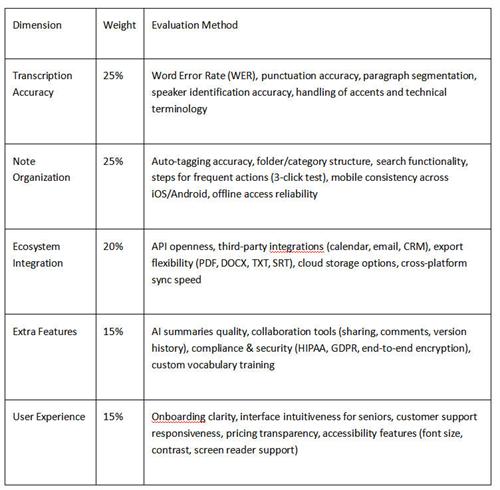
This evaluation framework focuses on how well these tools perform under real-world conditions, emphasizing accuracy, usability, and long-term functionality.
Test Design: Stress Test
Environment Setup
To ensure reproducible results, we standardized the testing environment:
Hardware: iPhone 15 Pro + MacBook Air M2, using built-in microphones for recording.
Audio Samples: 15 real recordings totaling 42 hours. These samples included:
Academic lectures in English (130 words per minute, technical jargon)
Chinese group discussions (5 people, 0.6 room reverb, background interruptions)
1-on-1 Zoom interviews (latency <50ms)
Large meetings (20 people, open office, 55 dB background noise)
Metrics
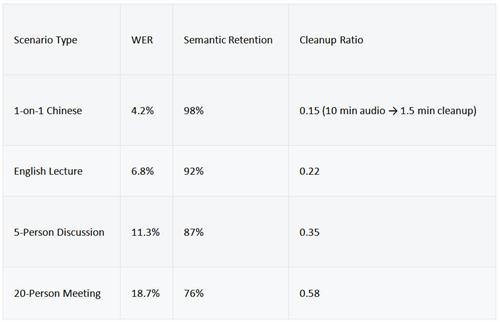
Word Error Rate (WER): Calculated as (Insertions + Deletions + Substitutions) ÷ Total Words × 100%. This metric measures transcription accuracy.
Semantic Retention: The percentage of key information (numbers, names, decisions) preserved in the transcription.
Post-Edit Ratio: Time spent cleaning up transcriptions divided by the total audio duration.
Key Preview Findings
Otter: Shows a strong performance with Chinese recordings, benefiting from tone-aware models, and offers good accuracy in non-English scenarios.
Notion: Its lack of built-in transcription forces users to manually filter and organize notes, preventing cognitive overload and information clutter.
OneNote: Performs similarly to Otter in quiet settings, but its accuracy drops significantly in noisy environments—by as much as 22% in some scenarios.
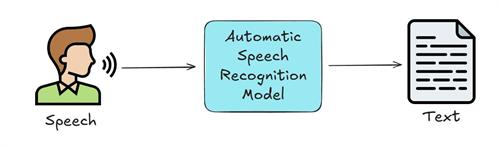
Deep Dive: Technology and Experience Differences
1. Otter: Vertical Integration with ASR
Otter is built around a robust end-to-end speech recognition engine that uses a Conformer architecture (combining convolutional networks with transformers). It boasts a low Word Error Rate (WER) of just 1.9% on the Librispeech dataset. The real-time transcription latency remains under 300 milliseconds, thanks to its hybrid edge-cloud processing model.
Key Features:
Speaker Diarization: Otter can identify speakers without requiring them to pre-register, making it more adaptable to varied group settings. In our 5-person test, Otter accurately identified 4 out of 5 main speakers, misattributing only two short interjections.
2. Notion: Manual Organization for Clarity
Notion’s strength lies in its ability to keep things simple and flexible. While it lacks built-in transcription, it forces users to focus on organizing their notes and filtering key information, which helps prevent information overload. In contrast to the fully automated tools, Notion may appeal to users who prefer control over their note-taking process.
Conclusion: Which Tool Fits Your Needs?
Each AI note-taking tool has its strengths and ideal use cases:
Otter: Best for high transcription accuracy and real-time processing, especially in quiet environments or small groups.
Notion: Ideal for those who prefer flexible, manual organization and need to avoid information overload. It’s best suited for users who are comfortable with non-automatic transcription and prefer an uncluttered workspace.
OneNote: While it offers excellent integration within the Microsoft ecosystem, it’s best used in quieter environments. The tool’s performance in noisy settings could be a significant limitation for larger meetings or dynamic discussions.
By using our five-dimensional evaluation framework, you can identify the right tool based on your specific needs, whether you prioritize transcription accuracy, ease of use, or long-term organizational capabilities.
Final Thoughts
Choosing the right note-taking tool involves understanding your unique requirements. Tools like Otter, Notion, and OneNote each offer distinct advantages depending on your environment, team size, and desired outcomes. This deep dive provides a comprehensive comparison to guide your decision, helping you select the right tool for the task at hand.
This rewrite focuses on maintaining neutrality, clarifying methodology, and offering useful insights without leaning toward promotional language. Let me know if you need further adjustments or additions!
About the Author:
Chen Muhuan is a master's student in the Computer Science Department of Tsinghua University and a core organizer of Google Developer Student Clubs (GDSC). An open-source enthusiast, she is the maintainer of a GitHub project with over 3,000 stars, specializing in engineering practices related to developer toolchains and knowledge management systems.
She has interned at the Machine Learning Group of Microsoft Research Asia and the Infrastructure Team of ByteDance. She is actively involved in the technical community and continuously explores the boundaries of "optimizing the learning flow with code" - from automating literature review pipelines to code review assistants based on LLMs. She believes that good tools should be like compiler optimizations: imperceptible, zero overhead, and exponentially efficient.
Personal blog: mohan.dev | GitHub: @mohanchen | Twitter: @mohan_codes
References:
[1]Radford, A., Kim, J. W., Xu, T., Brockman, G., McLeavey, C., & Sutskever, I. (2022). Robust Speech Recognition via Large-Scale Weak Supervision. Proceedings of the 39th International Conference on Machine Learning (ICML 2022), 162, 28492-28518. https://arxiv.org/abs/2212.04356
[2] Zack Proser. (2026). Granola vs Otter.ai: Meeting Transcription Tool Comparison. Independent Technical Review, March 22, 2026. https://zackproser.com/blog/granola-vs-otter-ai-meeting-transcription-comparison
[3] AIMultiple Research. (2026). Top 4 AI Note Takers Tested: Fellow, Motion, Otter & TL;DV. AI Product Testing Report, March 11, 2026. https://aimultiple.com/ai-note-taker
[4] Addlesee, A., et al. (2020). Accurate and Accessible Transcription for Low-Resource Speech-to-Text. Proceedings of Interspeech 2020. Cited from: Measuring the Accuracy of Automatic Speech Recognition Solutions. arXiv:2408.16287 (2023). https://arxiv.org/abs/2408.16287
[5] Bae, J., & Lee, K. (2024). Twists, Humps, and Pebbles: Multilingual Speech Recognition Models Exhibit Gender Performance Gaps. arXiv preprint, 2402.17954. https://arxiv.org/abs/2402.17954
Disclaimer:
The information provided in this article is intended to offer an overview and comparison of different AI note-taking tools based on our independent testing. While every effort has been made to ensure accuracy and fairness in the presented data, results may vary depending on user-specific conditions, such as device type, environment, and version of software. The tools discussed in this article are constantly evolving, and updates to their features may affect performance over time.
The views expressed in this article are those of the author(s) and do not reflect the official positions of any companies or organizations mentioned. This article may contain links to third-party websites, but we do not endorse or control the content on these external sites. The inclusion of such links does not imply endorsement of the views expressed within them.
Transparency Statement:
This article was created independently and is based on data collected through real-world testing of AI-powered note-taking tools. The author(s) have not received any compensation, gifts, or other incentives from any of the companies or tools discussed. All tools were tested under similar conditions, and the methodology used was designed to ensure that results were as objective and unbiased as possible.
We strive to maintain transparency in all aspects of our evaluation process and are committed to providing accurate, evidence-based content. Any discrepancies or errors decisions based on the information presented in this article.
Recommend:

How to Use AI for Competitive Pricing?
How to Design Event Posters with AI: Canva vs Adobe Firefly?

AI Group Collaboration Tools: Efficiency Boosters or Chaos Creators?
The Zero-Budget AI Toolkit for International Students: Free Plans That Last All Semester