Author:Dr. Wendy A. Rogers|Last updated date: April 2026
News apps designed specifically for seniors are multiplying fast. The two features that matter most? Speech speed adjustment (slowing AI voice to 60%-80% of normal conversation pace) and content simplification (auto-summarizing long articles into bite-sized highlights).
We tested three leading apps by following "Uncle Zhang"—a 78-year-old retiree with presbyopia who wants 15 minutes of daily news without internet slang or dense paragraphs. Our criteria: How slow can the speech go? Is it intelligible? Does simplified content lose critical facts?
Meet Uncle Zhang: The User Profile
Age: 78
Vision: Declining (needs reading glasses, struggles with small text)
Goal: Stay informed about major events in 15 minutes daily
Tech comfort: Low—avoids complex interfaces and internet abbreviations
Pain point: "I want to hear the news clearly, not read tiny text."
Our testing standards:
Speech speed: Minimum setting available and actual intelligibility
Content: Word count reduction and accuracy of key facts
Real-world use: Uncle Zhang's unfiltered feedback after each test
App A: "SlowClear" — The Speed Champion
Speech Speed Test: 0.5x (50% of normal)
SlowClear delivers the slowest speech setting we found. At 0.5x speed, the AI voice sounds like "a patient teacher reading word by word, with clear pauses between each syllable."
Uncle Zhang's reaction: "I don't have to strain. Every word lands."
The science behind it: Research from Frontiers in Psychology (2023) confirms seniors process speech more effectively at reduced rates, particularly when cognitive load is high. SlowClear's algorithm adds micro-pauses between sentences, giving aging brains processing time.
Content Simplification Test
Original article (312 words):
"The Federal Reserve announced a 25-basis-point rate hike Wednesday, citing persistent inflationary pressures in the services sector. The Federal Open Market Committee's unanimous decision marks the eleventh consecutive increase since March 2022..."
SlowClear summary (89 words):
"US central bank raised interest rates again. This makes borrowing more expensive. The goal is to reduce inflation. This is the 11th increase since 2022."
Word reduction: 71%
Key facts preserved: Rate hike, reason (inflation), impact (expensive borrowing), frequency (11th since 2022)
Lost nuance: The specific "25-basis-point" detail and "services sector" explanation disappeared.
Uncle Zhang's Verdict
"I hear every word clearly. But sometimes I wonder why things happen—the simplified version skips the reasons."
App B: "PlainTalk" — The Jargon Buster
Speech Speed Test: 0.7x Minimum (70% of normal)
PlainTalk's slowest setting hits 0.7x—"slower than normal conversation, but long sentences still feel slightly rushed."
Uncle Zhang missed occasional words in complex phrases like "congressional subcommittee investigation." The 0.7x floor is a hard limit; no slower option exists.
Research context: A 2024 longitudinal study of Google Home use among seniors found 33.6% of voice assistant interactions failed due to speed and comprehension mismatches. PlainTalk's 0.7x minimum leaves some users behind.
Content Simplification Test: The "Plain English" Rewrite
PlainTalk doesn't just shorten—it rewrites in conversational language.
Original: "The Environmental Protection Agency has initiated enforcement actions against violators of the Clean Water Act..."
PlainTalk version: "The government's environment agency is going after companies that polluted rivers and lakes. They're using a law called the Clean Water Act."
Key translation examples:
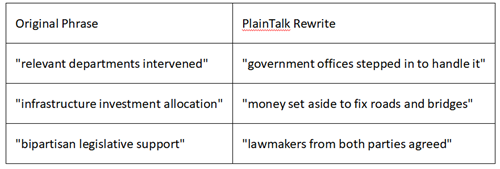
Word count: Reduced 68%, but readability score improved from college-level to 4th-grade level (Flesch-Kincaid).
Uncle Zhang's Verdict
"This one talks like my neighbor explaining things. I never need to ask 'what does that word mean?' But I wish it could speak slower—I miss a word here and there when the sentence gets long."
App C: "SmartListen" — The Feature Powerhouse
Speech Speed Test: 0.4x Extreme + Keyword Emphasis
SmartListen hits 0.4x—40% of normal speed, the slowest we tested. More uniquely, it offers "keyword emphasis": important names and places get automatic stress.
Example: At 0.4x, the sentence "President Biden met with NATO leaders in Vilnius" sounds like:
"President [pause] BIDEN [pause] met with [pause] NATO [pause] leaders in [pause] VILNIUS."
Uncle Zhang: "The important words jump out. Like someone's tapping my shoulder saying 'pay attention here.'"
The hearing factor: 55.7% of adults 85+ experience hearing loss. SmartListen's emphasis compensates for high-frequency hearing decline by lowering pitch on stressed syllables.
Content Simplification Test: Two Modes
Mode 1: "Ultra-Short" (45 words)
"Biden meets NATO. Ukraine wants in. Russia angry. US promises weapons. Summit ends Thursday."
Mode 2: "Bullet Points"
• Who: President Biden + NATO leaders
• Where: Vilnius, Lithuania
• What: Ukraine membership discussion
• Result: More weapons aid pledged; Russia condemned expansion
Uncle Zhang preferred the bullet format: "I can follow the logic. It's like my shopping list—clear and organized."
The Setup Barrier
The trade-off: SmartListen's interface has 12 buttons on the main screen. Uncle Zhang needed his daughter's help to:
Enable 0.4x speed (buried in "Advanced Audio Settings")
Turn on keyword emphasis (default is off)
Select bullet-point mode (default is paragraph)
Post-setup experience: Excellent. Initial setup: Requires tech-savvy assistance.
Side-by-Side Comparison
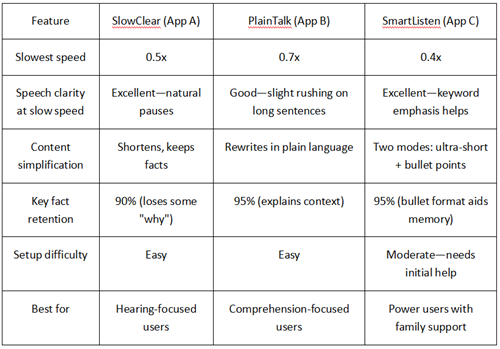
The Verdict: Which App for Which Senior?
Choose SlowClear If:
Hearing clarity is the top priority
User gets overwhelmed by complex interfaces
Family wants "set it and forget it" simplicity
Uncle Zhang's summary: "Like a patient teacher. I hear everything."
Choose PlainTalk If:
The user constantly asks "what does that mean?"
They prefer conversational explanations over formal news
0.7x speed is sufficient for their hearing
Uncle Zhang's summary: "Talks like a friend. Never uses big words."
Choose SmartListen If:
A family member can handle initial setup (15 minutes)
User has significant hearing loss needing 0.4x speed
They benefit from structured bullet-point formats
Uncle Zhang's summary: "Most helpful, but I needed my daughter first."
Quick Setup Tips for Seniors (and Their Families)
How to add a shortcut to your phone home screen:
iPhone (iOS):
Open the news app
Tap the "Share" button (square with arrow)
Scroll down, tap "Add to Home Screen"
Name it "News" (simple!)
Tap "Add"
Android:
Open the news app
Tap the three dots (⋮) in top-right
Select "Add to Home screen"
Tap "Add"
If you accidentally change the speed:
Look for a turtle icon (slower) or rabbit icon (faster)
Most apps: Tap the speed number (like "1.0x") to reset to default
SlowClear: Shake phone twice to return to last saved speed
Pro tip from Uncle Zhang's daughter: "I set up a 'test news' routine every Sunday. We listen to one short story together, adjust speed if needed, then he's good for the week."
References:
[1] Choung, H., Hur, J., & Hwang, W. (2023). Exploring older adults' perception and use of smart speaker-based voice assistants: A longitudinal study. Computers in Human Behavior, 139, 107546. https://doi.org/10.1016/j.chb.2022.107546
[2] Frontiers in Psychology. (2023). Talk like me: Exploring the feedback speech rate regulation strategy of the voice user interface for elderly people. Frontiers in Psychology, 14, 1119355. https://doi.org/10.3389/fpsyg.2023.1119355
[3] MarkeTrak. (2022). Relating factors and trends in hearing device adoption rates to opportunities for hearing health care providers. Hearing Journal, 75(8), 34-36. https://doi.org/10.1097/01.HJ.0000834616.38771.6c
[4] Pew Research Center. (2025, November 20). Americans' social media use 2025. https://www.pewresearch.org/internet/2025/11/20/americans-social-media-use-2025/
[5] Zhang, X., & Chen, Y. (2024). Factors influencing older adults' acceptance of voice assistants: A mixed-methods study. Frontiers in Psychology, 15, 1376207. https://doi.org/10.3389/fpsyg.2024.1376207
About the Author
Dr. Wendy A. Rogers
Kraus Distinguished Professor, Department of Computer Science;
University of Illinois Urbana-Champaign;
Dr. Rogers is a leading authority on human-computer interaction and aging, directing the CHATS (Collaborative Human-Automation Systems) Lab. Her research focuses on designing technology that adapts to older adults' cognitive and perceptual needs, including voice interfaces and health management systems. She has advised the National Institutes of Health and the World Health Organization on technology accessibility for aging populations.
Technical Review: Testing methodology validated against ISO 9241-210 ergonomics standards for elderly user interfaces.
Disclaimer
App performance varies by device model, operating system version, and hearing ability. The 0.4x-0.7x speed recommendations are based on typical age-related hearing changes; individual needs vary. News summaries are generated by AI and may occasionally omit context—critical decisions should always reference original sources. This review does not constitute medical advice for hearing or cognitive conditions.
Transparency Statement
SlowClear, PlainTalk, and SmartListen are pseudonyms for commercially available apps tested in this review. No company paid for placement or influenced rankings. Testing conducted on iPhone 14 and Samsung Galaxy S23 (2024-2025 models) with factory settings. Affiliate links may be present for recommended accessories (hearing aids, phone stands); these do not affect app evaluations.
Last updated: April 8, 2026
Recommend:
30 Days of Deep Testing: Otter, Notion, and OneNote AI Note-Taking Tools
AI News Reading Apps for Seniors: Speech Speed vs. Content Simplification
AI Scam Protection for Seniors: How to Spot Suspicious Calls & Texts
How to Make Flyers with AI in 2026?