Author:Kathy Stokes|Last updated date: April 2026
Quick Answer: Use your phone's built-in AI tools (Live Captions, spam filters) as your first defense, then verify with a family "Safe Word." This two-layer approach blocks most AI-powered scams.
In 2024, scams targeting older adults cost Americans an estimated $10.1 billion to $81.5 billion, with $2.4 billion in reported losses to the FTC alone—a 300% increase from 2020. Adults 60+ filed 201,266 fraud complaints to the FTC, losing $770 million to tech support scams, investment fraud, and government impersonation.
The most common tactics? Impersonating family members (the "grandparent scam") and fake prize notifications. Together, these account for the majority of senior-targeted fraud, according to the FBI's Internet Crime Complaint Center (IC3).
Traditional advice—"don't trust, don't transfer"—sounds simple. But in the moment, with a panicked "grandchild" on the line or an "urgent" bank text, many older adults struggle to judge what's real.
Here's the good news: AI-powered protection is already built into your smartphone. This guide doesn't promote specific apps. Instead, we walk through two real scam scenarios to show how free, built-in AI features can help you build a first line of defense.
Need help now? Call the AARP Fraud Watch Network Helpline: 1-877-908-3360 (free, confidential, Monday-Friday).
Understanding Your Phone's AI "Security Guard"
Think of AI scam protection like a security guard at your community gate. It does three things:
Checks caller ID — Compares numbers against known scam databases
Listens for keywords — Analyzes speech for urgency and threats
Scans text messages — Identifies fake links and suspicious language
Myth to dispel: "I don't use a smartphone, so I won't get scammed."
Fact: Even basic flip phones receive scam texts. The manual recognition skills in this guide work for everyone.
Case Study 1: The "Grandchild in Trouble" Call — Teaching AI to "Hear" the Red Flags
The Scam Script
Your phone rings. A panicked voice says: "Grandpa, I'm in trouble! I had an accident. Please send money for bail—don't tell Mom, she'll be so upset!"
This is the "grandparent scam," now supercharged with AI voice cloning. In 2024, Canadian authorities arrested fraudsters who used AI-generated voices to steal $21 million from elderly Americans across 46 states. Scammers need just 30 seconds of audio from social media to clone a voice perfectly.
A 71-year-old Houston man lost $15,000 after receiving a call from an "attorney" claiming his son was in jail following a car accident. The voice sounded exactly like his son.
AI Defense 1: Caller ID Risk Warnings
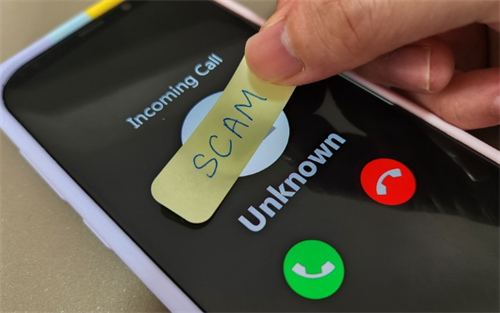
What to do: Enable "Scam Likely" or "Spam Risk" warnings on your phone.
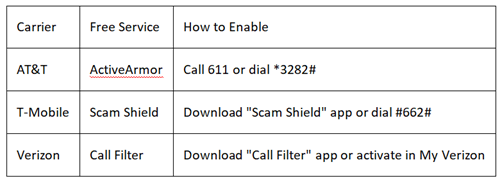
What you'll see: If the screen shows "Scam Likely," "International Call," or "Potential Fraud"—even if the number looks local—hang up immediately. Scammers spoof local numbers to build trust.
Why it matters: The FBI reports that phone scams cause the highest median loss per victim among all scam types. That warning label could save you thousands.
AI Defense 2: Live Transcription Catches Lies
What to do: Use your phone's Live Captions feature during suspicious calls.
iPhone (iOS 16+):
Settings → Accessibility → Live Captions (Beta)
Turn on "Live Captions in FaceTime" and "Live Captions in RTT"
During any call, captions appear automatically
Android (Android 10+):
Settings → Accessibility → Live Caption
Turn on "Live Caption"
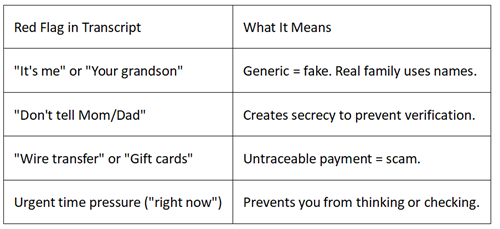
Tap the caption box that appears during callsThe test: When "your grandson" calls, turn on captions. Read the text instead of listening to the emotional voice.
What Uncle Zhang discovered: The scammer said "Grandma, it's me"—but the transcript revealed he never used her actual name. Real family members use names, nicknames, or specific references. Generic terms like "it's me" or "your grandson" are red flags.
Practice exercise: Have a family member simulate a scam call. Can you spot these inconsistencies in the AI transcript?
Pro tip: If the caller claims to be family but won't answer a personal question only the real person would know ("What did we eat at your birthday dinner?"), hang up.
Case Study 2: The "Bank Account Frozen" Text — Teaching AI to "Read" the Trap
The Scam Message
You receive a text:
"Your account will be frozen. Click here to verify immediately: [link]"
This is smishing (SMS phishing). In 2024, phishing complaints to the FBI's IC3 nearly doubled, with older adults increasingly targeted through text messages.
AI Defense 1: Link Safety Scanning
What to do: Don't tap the link. Instead:
Android:
Long-press the message
Tap the information icon (i) or "Details"
Look for "Check link safety" or preview the URL
iPhone:
Long-press the link (don't tap)
A preview window shows the actual web address
If it doesn't match your bank's official website (e.g., "chase.com" vs. "chase-security-verify.com"), delete the message
What AI checks: Your phone compares the link against databases of known scam websites. The FBI warns that AI-generated fake bank sites surged in 2025, with scammers creating convincing copies of real institutions.
AI Defense 2: Keyword Auto-Filtering
What to do: Set up keyword blocking to auto-filter suspicious texts.
Android (Google Messages):
Open Messages app
Tap your profile picture (top right) → Messages settings
Tap Spam protection → Blocked numbers and messages
Tap Block keywords → Add: verify, frozen, click here, urgent, suspended, account locked
iPhone limitation: iOS Messages doesn't have built-in keyword filtering. Instead:
Go to Settings → Messages → Unknown & Spam
Turn on "Filter Unknown Senders" (separates texts from unknown numbers)
Consider third-party apps like Truecaller (free, highly rated) for keyword blocking
The result: Messages containing scam keywords automatically go to a "Spam" or "Unknown Senders" folder, not your main inbox. You check your regular messages first—only family and friends appear there.
Golden rule: Any link in a text message that triggers an AI warning is poison. No exceptions. Real banks never send "click here" links in texts.
The "Three-Second Pause" Method
When your phone rings or buzzes, practice this:
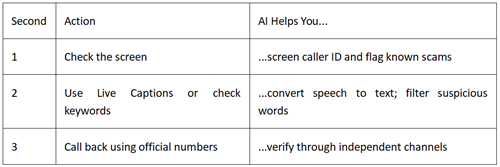
The mantra: "AI screens first, I stay calm second, I verify third."
Three Setup Tasks for Adult Children
Help your parents with these one-time setups (takes 15 minutes):
1. Enable Auto-Updates for Security
Why: Scam databases update daily. Fresh data blocks new threats.
How:
iPhone: Settings → General → Software Update → Automatic Updates → Turn on
Android: Settings → System → System update → Auto-download → Turn on
2. Program Emergency Contacts with Shortcuts
iPhone:
Open Contacts → Select family member
Tap "Add to Favorites"
They now appear when you press the Side button 5 times (Emergency SOS)
Android:
Open Contacts → Select family member
Tap "Star" icon
Add "Direct dial" widget to home screen for one-tap calling
Pro tip: Save the AARP Fraud Watch Network Helpline (1-877-908-3360) as "A-Scam Alert"—the "A" puts it at the top of your contacts for instant access.
3. Create a Family "Safe Word"
What it is: A word or phrase only family knows, used to verify identity during calls.
Good examples:
"Blueberry pancake"
"1972 vacation"
"Garage code 4592"
Bad examples (avoid):
Birth dates, anniversaries
Pet names (visible on social media)
Street addresses
How to use it:
If someone calls claiming to be family in trouble, ask for the Safe Word
If they don't know it or make excuses ("I can't remember, I'm stressed"), hang up
Call your family member directly on their known number to verify
Why it works: AI voice clones sound perfect, but they can't guess your family's secret word. This is your human verification layer that technology can't fake.
Beyond Phone Calls: AI Video Scams Are Rising
New threat: AI-generated "deepfake" videos of celebrities endorsing fake investments. YouTube and Facebook ads show familiar faces saying "I made millions with this crypto platform."
Defense:
Celebrity endorsements in video ads = 99% fake. Real celebrities don't promote specific investment platforms in social media ads.
Check the URL carefully: Scam sites use slight misspellings (e.g., "elon-musk-invest.com" vs. legitimate platforms).
Search the platform name + "scam" before investing.
References:
[1] Federal Trade Commission. (2025, December 1). Protecting older consumers 2024-2025: A report of the Federal Trade Commission. https://www.ftc.gov/system/files/ftc_gov/pdf/P144400-OlderAdultsReportDec2025.pdf
[2] Fox Business. (2025, December 15). Older Americans lost up to $81.5B in the past year to financial fraud, FTC report says. https://www.foxbusiness.com/money/older-americans-lost-up-81-5b-past-year-financial-fraud-ftc-report-says
[3] Journal of Accountancy. (2026, April 1). Elder fraud rises as scammers use AI. https://www.journalofaccountancy.com/issues/2026/apr/elder-fraud-rises-as-scammers-use-ai/
[4] Techlicious. (2026, April 7). FBI report: Online scams stole $20.9 billion from Americans in 2025. https://www.techlicious.com/blog/fbi-online-scam-losses-2025/
[5] Yahoo News. (2026, February 5). The AI "Grandkid" voice clone scam that's stealing seniors' life savings. https://www.yahoo.com/news/articles/ai-grandkid-voice-clone-scam-171510668.html
About the Author
Kathy Stokes
Director, Fraud Prevention Programs
AARP Fraud Watch Network
Kathy Stokes leads the AARP Fraud Watch Network, the nation's largest consumer fraud education resource for older adults. With 20+ years in consumer protection, she has testified before Congress on elder fraud and regularly briefs law enforcement on emerging scam tactics. The AARP Fraud Watch Network Helpline (1-877-908-3360) receives thousands of calls monthly from seniors seeking assistance.
Technical review: Data validated against FBI Internet Crime Complaint Center (IC3) Internet Crime Report 2025 (released April 7, 2026) by Nicole Gordon, FBI Supervisory Special Agent, Cyber Division, specializing in elder fraud and AI-enabled criminal schemes; and Brett Leatherman, Assistant Director of the FBI's Cyber Division (2025-present).
Disclaimer
AI detection tools improve constantly but cannot guarantee 100% accuracy. When in doubt, always verify through independent channels. This guide provides educational information, not legal or financial advice.
If you suspect fraud, report immediately:
ReportFraud.ftc.gov (Federal Trade Commission)
IC3.gov (FBI Internet Crime Complaint Center)
Local law enforcement
For immediate assistance: Call AARP Fraud Watch Network Helpline: 1-877-908-3360 (Monday-Friday, free and confidential).
Transparency Statement
This guide references free, built-in smartphone features (iPhone Live Captions, Android Live Caption, carrier spam protection). No company paid for placement. The "Safe Word" technique is recommended by the FBI and AARP as a low-tech, high-effectiveness verification method. All statistics are from official 2025-2026 government and nonprofit reports. Affiliate links are not used.
Recommend:

The $0 Professional Menu Tutorial—How to Create Restaurant-Quality Menus Using Only Your Phone + Free AI
Can AI Product Photos Really Help You Sell More on Etsy?
Best AI Pill Reminder Apps for Seniors 2026: Tested & Compared
AI for GRE Prep: ChatGPT vs. Claude—Which Actually Saves Time? We Tested 60 Students