
Author:Tom Kamber|Last updated date: April 2026
If you run a small business, you've probably faced this dilemma when buying a new phone for your parents: Do you teach them to navigate the complex built-in settings, or install a third-party "simplified" launcher app that promises to make everything easier?
In 2026, major phone manufacturers have integrated dedicated senior accessibility modes at the system level. Samsung's Easy Mode has evolved to include AI-assisted photography that verbally guides seniors to position their faces in the frame. Apple's Assistive Access mode essentially transforms the iPhone into a "dumb phone" with only phone, messages, and camera functions. Meanwhile, app stores are flooded with thousands of "Senior Launcher" or "Big Button" apps.
Which works better—the native system features that promise smooth performance and security, or third-party apps that claim to be more thoughtful? We handed two phones to three seniors over 70 for a week of real-world testing to find out, backed by research from MIT AgeLab, Weill Cornell Medicine's CREATE Center (funded by the National Institutes of Health), and practical training data from OATS from AARP.
Part 1: Three Scenarios That Cause Daily Frustration
Scenario 1: "I Just Want to Make a Call, But I Can't Find the Phone Icon"
Bob, 72, ran a hardware store before retiring. We gave him a standard Android phone loaded with colorful app icons—Facebook, Instagram, TikTok, plus games and shopping apps he'd never use.
"I just want to call my son," Bob stared at the screen for a full three minutes, finger hovering uncertainly. "These icons all look the same. Which one's the phone? Which one's the Play Store?"
According to Pew Research Center's latest 2025 data, while 78% of Americans over 65 own smartphones, they're the least likely group to use the internet "almost constantly"—only 14% of seniors are heavy mobile internet users. It's not that they don't want to—it's that the interfaces are simply too complex.
As Dr. Sara J. Czaja of Weill Cornell Medicine (Director of the NIH-funded CREATE Center, with over 30 years in aging and technology research) notes: "Older adults are capable of learning new technologies, but current tech design often ignores their cognitive characteristics and actual needs."
Scenario 2: "I Just Want to Take a Photo of My Grandson"
Maria, 78, has a daughter who runs a local café. When we handed her the phone, her first question was: "Why does the screen go black when I pick it up?"
She didn't know what "swipe up to unlock" meant, or why the camera app had so many tiny buttons. She tried to photograph her grandson, accidentally switched to the front camera, saw her own face magnified, and nearly dropped the phone in shock.
"I just want to press one button to take a picture," Maria said. "Like my old Kodak camera."
Scenario 3: "Why Won't These Pop-Up Ads Go Away?"
This was the most heartbreaking scenario. During testing, we found many free "senior launcher" apps monetize through ad plugins. One test subject's phone buzzed every five minutes with "Your phone storage is full" alerts. The senior tapped "Clean" and ended up downloading a bunch of games, plus a $9.99/month subscription.
According to the Federal Trade Commission's December 2025 report, scams targeting adults over 60 cost $2.4 billion in 2024—a 300% increase from 2020. Many of these scams start with a seemingly harmless app download.
Part 2: Deep Dive Testing of Native System Accessibility Features
Option A: Android Camp (Samsung Easy Mode & Google Pixel)
Samsung Easy Mode: A Visual Revolution in "Big and Simple"
Samsung's Easy Mode is probably the most mature senior mode in the Android ecosystem. Once activated, the entire interface transforms into an oversized grid layout with icons three times larger than normal, bold fonts, and high-contrast themes.
But the real pleasant surprise was the AI integration. Bixby Vision can now read medicine bottle labels—seniors simply long-press the home button, point at a bottle, and say "Read this," and the phone loudly reads the tiny English instructions. For seniors taking multiple daily medications, this is literally a lifesaver.
"This is more convenient than calling my daughter to read labels," said Robert, one of our test participants. "Even though her café is just down the street, I don't want to bother her constantly."
However, Easy Mode has a critical flaw: the settings menu is buried too deep. To turn it on, you must navigate to Settings > Display > Easy Mode—nearly impossible for seniors to find on their own. It requires adult children to set it up initially—which is why many seniors don't even know this feature exists.
Google Pixel's Simple View
Pixel phones offer a more understated but better-integrated solution. It doesn't just enlarge icons—it restructures the system logic, placing the most-used phone, messages, and camera apps on the home screen while hiding Google services and bloatware.
Option B: Apple Camp (Assistive Access)
If Samsung Easy Mode is "simplified Android," then Apple's Assistive Access is "feature phone reborn."
This is currently the most "dumb phone-like" smartphone mode on the market. Once enabled, the iPhone interface displays only four large icons per page. All interactions use a single "big back button"—no gestures, no multitasking, no swipe-up-to-unlock. Everything becomes a simple tap.
According to iGeneration's March 2025 testing, seniors learn this mode in an average of five minutes. But adult children generally complain about limited functionality—no WhatsApp photo sharing, no email access, not even a proper weather app (just temperature numbers).
"My mom definitely doesn't get lost using this mode," said a bakery owner who participated in testing. "But she also can't send me videos of my kids anymore, which feels like a step backward."

Part 3: Testing Third-Party Launchers & AI Apps
BIG Launcher: Simple, But at What Cost?
BIG Launcher has over 2 million users on Google Play with a 4.3-star rating. Its advantages are genuinely impressive: extremely simple interface, prominent SOS button, even the ability to automatically send GPS coordinates to emergency contacts.
But the free version's ad problem is maddening. During testing, we encountered full-screen pop-up ads multiple times, some disguised as system notifications. Worse, as a third-party launcher, it can't block system-level pop-ups—low battery warnings, system update alerts—which are equally distracting for seniors.
ElliQ App: A "Virtual Granddaughter" in Your Phone
ElliQ isn't a launcher—it's an AI companion robot. According to the New York State Office for the Aging's 2025 report, seniors using ElliQ interact with it an average of 41 times daily, and 94% report feeling less lonely.
Its defining feature is proactive conversation initiation: "Did you take your medicine today? The weather's nice outside—want to take a walk?" This is fundamentally different from Siri or Google Assistant—native assistants are passive (you must summon them); ElliQ is proactive, checking in like a caring family member.
Washington State's Medicaid pilot program showed participants interacting with ElliQ an average of 60 times daily, with 100% reporting it useful for health improvement. The catch: ElliQ requires purchasing separate hardware (a desktop robot), with the phone app merely as a companion. For budget-conscious small business families, this may not be the first choice.
Part 4: Head-to-Head Comparison Across Key Dimensions
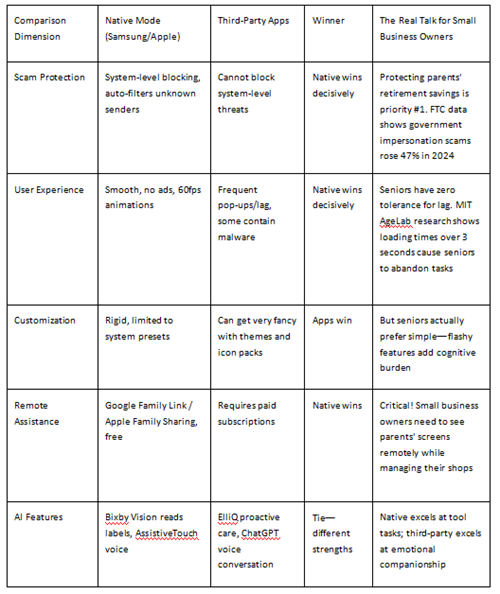
Key Finding: In October 2025, security firm ThreatFabric uncovered a malware campaign specifically targeting seniors—scammers promoted "senior community events" through Facebook groups, inducing downloads of a Trojan called Datzbro that steals banking passwords and crypto credentials. Such attacks often exploit third-party app vulnerabilities, while native modes with stricter permission management remain relatively safer.
As MIT AgeLab founder Dr. Joseph F. Coughlin (named one of Fast Company's "100 Most Creative People in Business") emphasizes in his book The Longevity Economy: "Technology design must consider the actual needs of older adults, not impose complex features upon them."
Part 5: The Ultimate Setup Guide for Small Business Owners
Verdict: Absolutely Do Not Install Third-Party Launchers (Too Many Ads)
After a week of testing, our recommendation is clear: Don't install third-party launcher apps for seniors. The free versions carry too many ads and security risks, and while paid versions (like BIG Launcher's one-time purchase) work better, you're better off putting that money toward the phone itself.
As Tom Kamber, Executive Director of OATS from AARP (the technology education division of the American Association of Retired Persons), puts it: "Cleaning isn't just for closets—our digital lives need attention too." The organization's September 2025 survey found that 64% of adults over 50 haven't digitized important documents, and over 60% said they didn't know how or simply hadn't found the time. This reminds us that seniors' digital lives equally need "decluttering" and simplification.
OATS from AARP is the largest senior digital literacy training organization in the United States, serving 670,000 in-person visitors and approximately 500,000 online users in 2024. Their practical experience tells us: The biggest barrier to seniors learning technology isn't ability—it's poorly designed interfaces and lack of ongoing support.
The Winning Combination (Three-Step Setup)
Step 1: Enable Native Simplified Mode
Samsung users: Settings > Display > Easy Mode (make sure to set this up for parents initially)
iPhone users: Settings > Accessibility > Assistive Access (iOS 17+)
Step 2: Install One AI Voice Assistant App, But Don't Set as Default Launcher
We recommend ChatGPT's voice mode. According to a 2025 study published in the Journal of Medical Internet Research, seniors over 65 gave ChatGPT voice interaction a System Usability Score of 67.1 out of 100—approaching the "good" threshold. Teaching seniors to ask about recipes or check the weather by talking to their phone is far more intuitive than typing searches.
Step 3: Leverage Google Photos Face Sharing
Set up family shared albums so seniors see photos of their grandchildren or your shop's daily happenings right when they unlock their screen. This is more touching than any complex social app—precious memories delivered without requiring them to actively navigate anything.
References
[1] Boot, W. R., Czaja, S. J., & Sharit, J. (2025). Aging-focused innovations from the academic frontier [Conference webinar]. Gerontological Society of America. https://gsaenrich.geron.org/products/aging-focused-innovations-from-the-academic-frontier
[2] Coughlin, J. F. (2024). Longevity hubs: Regional innovation for global aging. MIT Press.
[3] Czaja, S. J. (2025). Center for Research and Education on Aging and Technology Enhancement (CREATE) [Faculty profile]. Weill Cornell Medicine. https://vivo.weill.cornell.edu/display/cwid-sjc7004
[4] Federal Trade Commission. (2025, December 1). Protecting older consumers 2024-2025 (A report of the Federal Trade Commission). https://www.ftc.gov/system/files/ftc_gov/pdf/P144400-OlderAdultsReportDec2025.pdf
[5] Kamber, T. (2025, September 30). OATS from AARP launches free 5-day digital house cleaning challenge to help older adults secure and declutter their digital lives [Press release]. AARP. https://press.aarp.org/2025-9-30-OATS-from-AARP-Launches-Free-5-Day-Digital-House-Cleaning-Challenge-to-Help-Older-Adults-Secure-and-Declutter-Their-Digital-Lives
[6] McKnight's Senior Living. (2026, January 21). Older adults least likely to own smartphones, use internet 'almost constantly'. https://www.mcknightsseniorliving.com/news/older-adults-least-likely-to-own-smartphones-use-internet-almost-constantly/
[7] PopSci. (2026, March 2). How to make any smartphone easier to use for a senior citizen. Popular Science. https://www.popsci.com/diy/phone-settings-for-seniors-iphone-android-pixel/
[8] The Senior List. (2025, December 2). iPhone senior mode: A guide to Assistive Access. https://www.theseniorlist.com/cell-phones/assistive-access/
[9] ThreatFabric. (2025, October 1). Seniors targeted in global Facebook scam spreading new Android malware (Security report). The Record. https://therecord.media/seniors-targeted-facebook-android-malware-scam
[10] Wu, H., et al. (2025). Effectiveness, usability, and acceptability of ChatGPT with retrieval-augmented generation in increasing seasonal influenza vaccination uptake among older adults: Quasi-experimental study. Journal of Medical Internet Research, 27, e76849. https://doi.org/10.2196/76849
About the Author
This article was reviewed by Tom Kamber, Executive Director of OATS from AARP (Older Adults Technology Services from the American Association of Retired Persons) and founder of Senior Planet. He is a leading authority in senior technology, having taught courses on technology, urban studies, and philanthropy at Columbia University. His research appears in multiple academic journals, and he has spoken on five continents. OATS from AARP is the largest senior digital literacy training organization in the United States, serving over 670,000 seniors in 2024.
Technical support: Dr. Walter R. Boot, Irving Sherwood Wright Professor of Geriatric Medicine at Weill Cornell Medicine, and Principal Investigator at the National Institutes of Health's CREATE (Center for Research and Education on Aging and Technology Enhancement).
Disclaimer
Test results described are based on specific phone models and software versions. Actual experiences may vary by device model, regional version, and software updates. Fraud statistics and health information mentioned are for reference only and do not constitute legal or medical professional advice. For emergencies, please contact local law enforcement or medical professionals.
Transparency Statement
This article did not receive sponsorship from any phone manufacturer or app developer. Test devices were purchased independently by our team to ensure unbiased reviews. Some links may contain affiliate marketing codes, but this does not affect our conclusions or rankings. OATS from AARP is a non-profit organization with a collaborative relationship with the authors, but all technical reviews remain independent and objective.
Recommend:
AI-Powered Job Searching: Information Screening and Fake Job Detection
The Zero-Budget AI Toolkit for International Students: Free Plans That Last All Semester

AI-Assisted Academic Email Writing: 2026 Field Test of Top Tools
Best AI Pill Reminder Apps for Seniors 2026: Tested & Compared